The trading journal that knows your prop rules.
For futures and forex CFD prop traders. Import from Tradovate, NinjaTrader, Rithmic, TopstepX or MetaTrader 5, see what makes and costs you money, and stay inside every firm rule.
Waited for the retest. Held to target.
From broker export to better trading.
Five minutes to set up. The rest is the habit: log the day, review the trades, fix one thing.
Import or add your trades
Drop in an export from Tradovate, NinjaTrader, Rithmic, TopstepX, Interactive Brokers or MetaTrader 5, or any CSV of trades or fills. Check the preview, then import. Duplicates are skipped. No export to hand? Add the trade yourself.
Review every trade
Pick the playbook, tick the rules you followed, grade it, tag your mistakes and emotions, and paste in a screenshot of the chart.
See what actually pays
Reports by session, hour, setup, tag, mistake and emotion show where your edge is and what your bad habits cost you in dollars.
Everything a review needs. Nothing you'll skip.
One place for the plan, the trades and the lesson, kept for every account you trade.
It tells you when you’re done for the day.
Set your own day rules: a profit stop, a loss stop, a max number of trades or losses, the markets and size you trade, a cool-down after a loss. Wickform can’t stop you trading. It says “Done for today” the moment a rule is hit, marks every trade that breaks one, and shows what breaking them has cost you.
- Rule-followed vs rule-broken P&L, side by side
- A streak of days you kept every rule, whatever the P&L
- A+ checklist: anything less is logged as a B setup
- An if / then card to read before the session
Review it while it's fresh
- Playbook with a rule checklist and an adherence score
- Grade, confidence, emotion and mistakes
- Screenshots: upload, drag in or paste
- The trade on a chart, if you import bars for that market
- Replay it bar by bar from an hour before your entry
- Tags, notes and templates for a quick write-up
A page for every trading day
- Pre-market plan and end-of-day recap
- Mood, screenshots and that day's trades
- A P&L calendar to see the month at a glance
Every eval and funded account
- Its own starting balance and fees
- Every view filters by account and date
- A journal score from 0 to 100
One goal for next week
The week’s results, days you kept your rules, best and worst trade, then three questions: what went well, what to fix, and one goal. Next week opens with that goal and asks if you kept it.
Every setup on one page
Its checklist and how often you actually tick each rule, its results live and on replay side by side, and its best trades as the examples to look at before the session.
Share your month, not your account
Turn a month's P&L calendar, a week or a prop account into an image for X, Discord or Instagram. Show dollars, a percentage, R, or no amounts at all. It's made in your browser, with no account names on it.
Built for evals and funded accounts.
Most journals treat a prop account like any other. Wickform knows about trailing drawdowns, daily loss limits and consistency rules.
Know how close you are to breaking the account.
Load your firm's preset on a journal account and every import updates the room left before the max loss limit, the daily loss used, your consistency percentage, trading days and the distance to target.
Are you actually up?
Log eval fees, resets, activations and payouts. See everything prop trading has cost you against what it paid, across every account. Before you log the next eval, Wickform shows your last 20 trading days and offers to wait 48 hours.
Your chance of passing, from your own trades
Your real results reshuffled thousands of times under a firm's rules: the odds you pass, the odds you hit the max loss, and the typical days to pass.
Rehearse the eval first
Replay a session under a firm's exact rules. No rewinding: hit the max loss and the account fails, as it would for real.
One dashboard for your trading. First month or fifth year.
Start with the numbers anyone can read: P&L by day, win rate, streaks. Go deeper when you're ready, with expectancy, R multiples, drawdown, Sharpe and how far each trade ran.
Discipline is how many of your playbook's rules you ticked on each trade. Here the weak spot is average win / loss: winners aren't big enough yet.
Seven trades with a mistake turned a +$4,760 month of clean trades into +$2,845. That's the number to bring down first.
Mark the day you changed something, like no more lunch trades or done after two losses. Wickform draws the line and compares your average day and green days before and after, so you know whether the rule is paying.
Each demo trade comes with a chart of its own. Add your own screenshots and they become the covers. Days without one get a date tile with a square per trade.
Drag a widget by its grip to move it, or up into the full-width row. Hide what you don't use and add it back any time. Your layout is saved in your browser, so the dashboard opens the way you left it.
Plus 15 breakdowns (session, hour, weekday, playbook, tag, grade, mistake, emotion, hold time, side, symbol and more), winners against losers, and practice trades against live ones.
See what's working in plain numbers
- Green and red days on a calendar, with weekly totals
- Win rate on trades and on days
- Your current streak, and your longest runs
- What each mistake cost you
- A journal score with a tip on every number
Measure your edge like a fund would
- Expectancy and R multiples, per setup
- Drawdown, recovery factor, Sharpe and Sortino
- MAE / MFE: how far each trade ran for and against you
- R-multiple distribution and a weekday × hour heatmap
- Results by session, hour, playbook, grade and emotion
- Pass odds from your own trades on each prop account
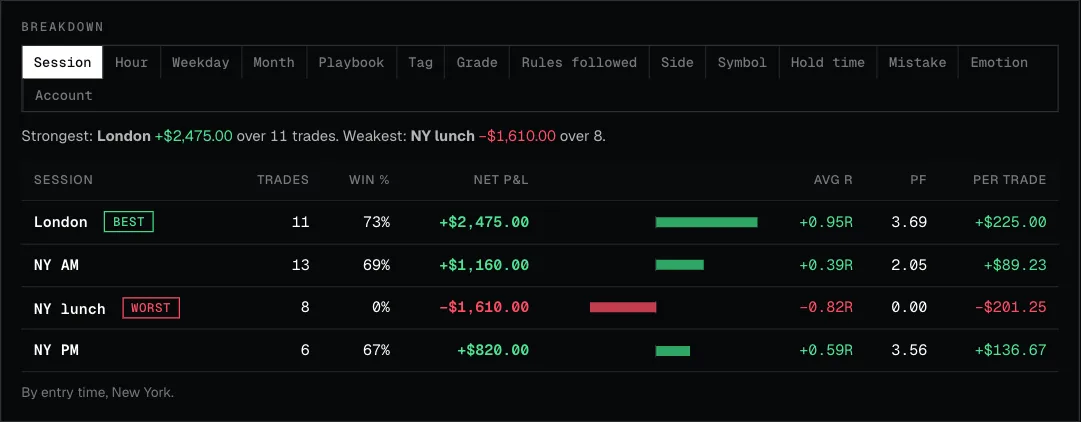
Find the session where your edge lives
Results by session, hour, weekday, month, playbook, tag, grade, rules followed, mistake, emotion, hold time, side, symbol and account. Filter by any of them.
How far each trade ran for and against you
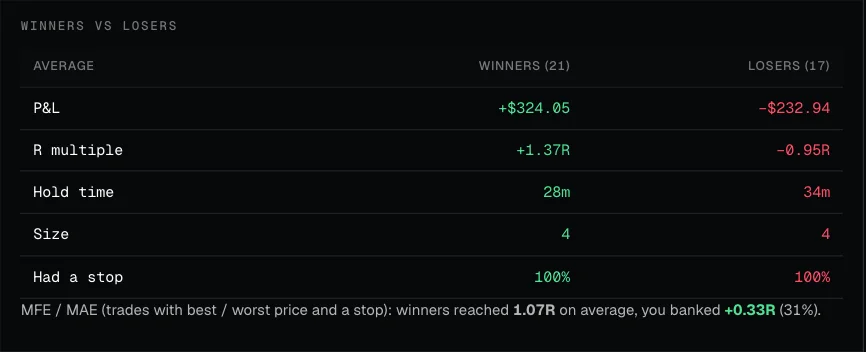
What your best trades have in common
Side by side: hold time, rules followed, grade, session and tags for your winners and your losers.
Practise like it counts. Before it does.
Replay any market bar by bar with the future hidden, take evaluations you can actually fail, and drill a session a day. Bring your own data: import the bars you already have and Wickform replays them in your browser.
BYOD Bring your own data. Wickform doesn’t sell or serve market data.
- Rewind 3 candles at most
- No deleting trades
- A breach flattens you at the limit price
- Balance and rules lock at the start
Presets for the common futures firms, or set your own target, drawdown, daily loss and consistency rules.
Each one opens with the days that got it there: the calendar and trade history show the losing days, the revenge trades and the oversized stops. Then it’s real firm rules, random blind days and the same no-undo challenge mode. Every attempt counts toward your hardcore record.
One random day, date hidden. Trade the session you pick and get a score in R. One a day keeps your streak.
A whole prop evaluation over random days, one after another. Pass the target before you hit the drawdown.
Passed? Keep going on a funded account with its own drawdown and payout rules, and request a payout.
Pick a market and dates, write down the strategy, and replay freely with up to 8 charts side by side.
Every drill counts toward your pass rate, payouts and streak, shown on the drills page.
Hover a trade on the chart for its entry, exits and net P&L, then keep replaying from there.
Missed a setup? Log it as a missed trade, so your results count the ones you didn’t take as well.
Bars stay in your browser, and you use them under your provider’s terms. Import once, replay as often as you like.
Compare every challenge, then simulate one.
Picking an evaluation is the first trade a prop trader makes. See 191 futures, forex / CFD and crypto challenges side by side, then play the one you like out under its own rules before you pay for it.
 Best picks update as you filter
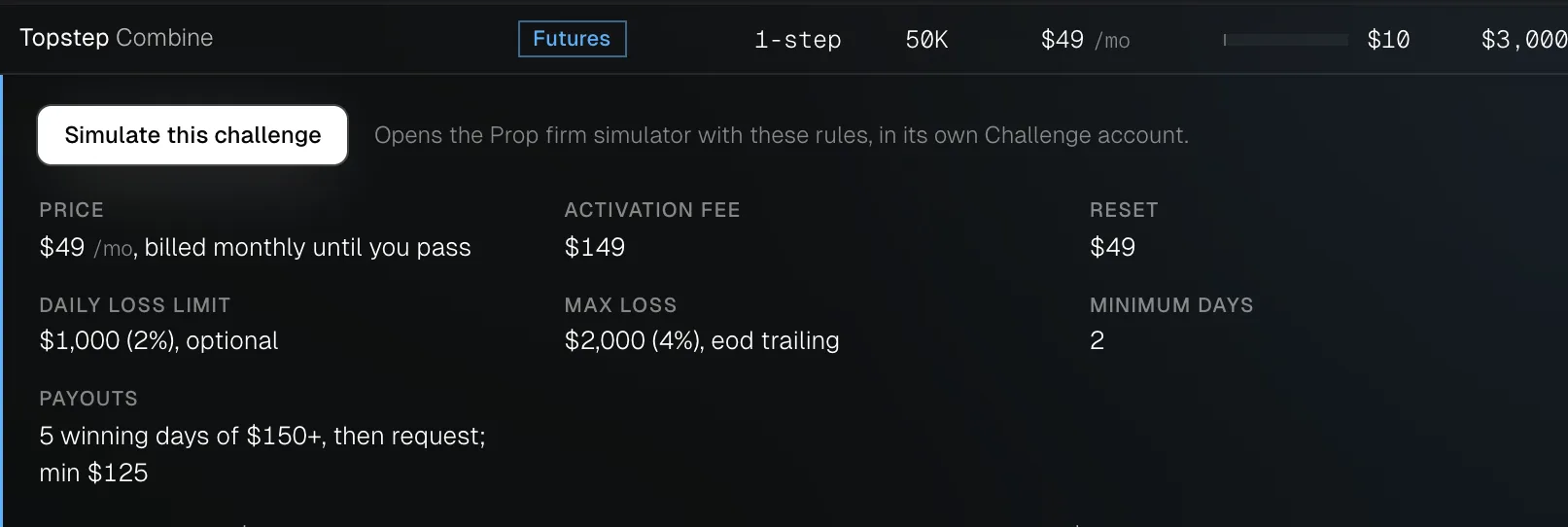
One click from a row to the simulator
Open a challenge for its fees, payouts and rules, then press Simulate. Its profit target, max loss, daily limit, consistency rule and minimum days load into a Challenge account of its own.
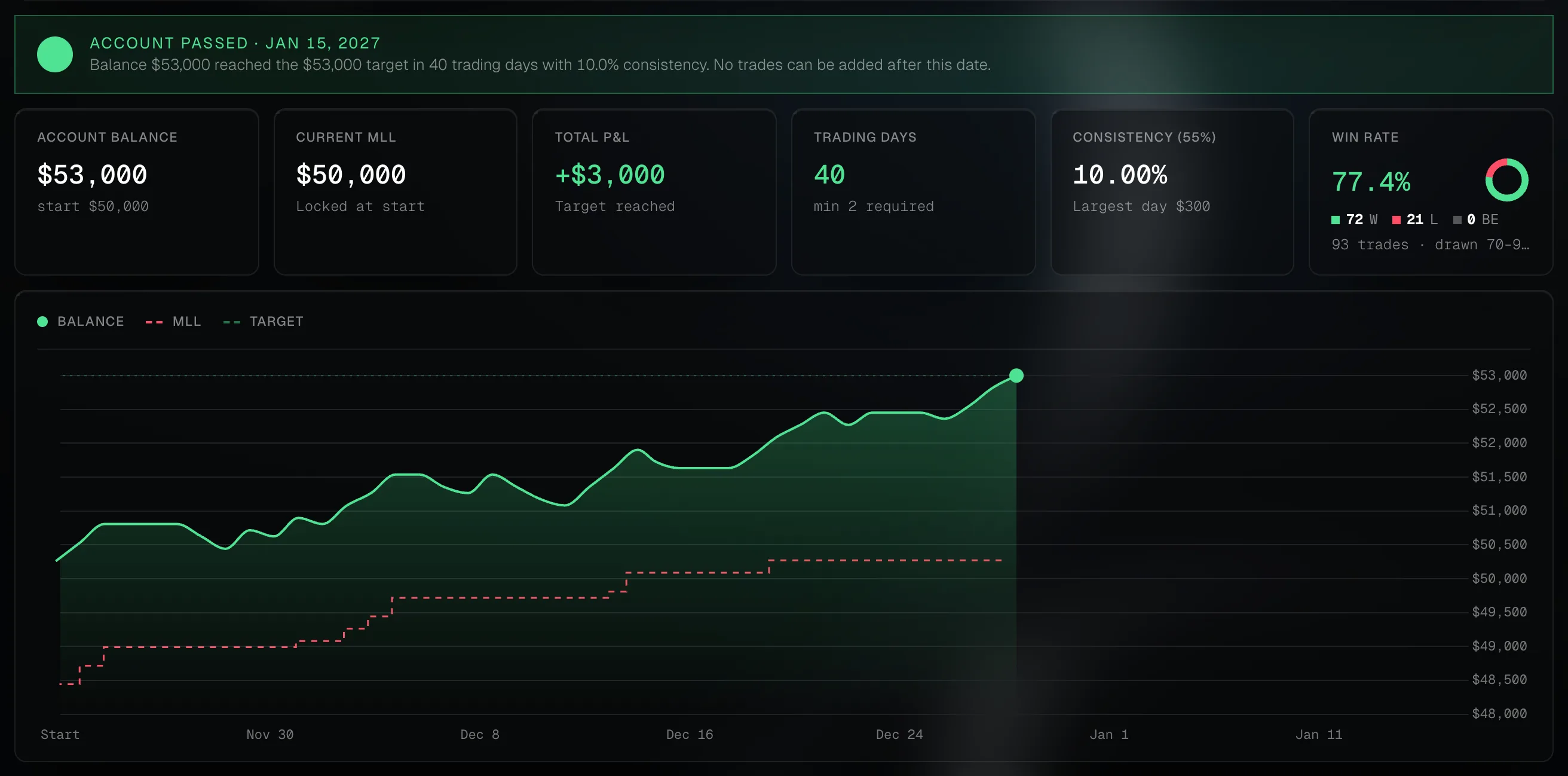
See whether you’d have passed
Play your risk, reward and win rate out day by day, or log days by hand. The balance, the trailing max loss, consistency and trading days are checked as you go, and a breach ends the account as it would for real.
Futures, forex / CFD and crypto
Filter by market, challenge type, account size and drawdown, or by must-haves: no daily loss limit, a refundable fee, news trading allowed, a one-time fee. Rules and prices change often, so every row links to the firm’s own page to check before you pay.
One subscription. Journal and replay included.
Most traders pay for a journal and a replay tool separately. Here they're one app, at one price.
- 50 trades, 1 account
- Every import, or add trades by hand
- P&L calendar and daily journal
- Core stats and equity curve
- 2 replay sessions
- 2 charts side by side
- Daily blind drill
- Everything in Free, plus
- Unlimited trades
- 3 accounts and 1 prop account
- Every report, with MAE / MFE
- Mistakes, emotions and playbooks
- 20 replay sessions, drills and challenges
- 4 charts side by side
- Rewind, HTF candles, partials and trailing
- Everything in Pro, plus
- Unlimited accounts and prop accounts
- Unlimited replay sessions and challenges
- Unlimited screenshots, playbooks and indicators
- Pass odds for each firm
- Costs, payouts and net return
- Exit optimizer
- 8 charts side by side, priority support
Your trades never leave your browser.
Sign in with Google, then everything stays on your device: no upload, no broker password. Wickform runs in your browser and keeps your journal there.
No broker login
You import the report your platform already gives you. Wickform never asks for your broker or prop-firm password.
Stored on your device
Trades, notes and screenshots are saved in this browser. Nothing is sent to our servers.
One file to move it
Download a backup of your whole journal at any time, and restore it in another browser or on another computer.
Questions, answered.
About the journal, analytics, prop accounts, backtesting, your data and pricing.
General
What is Wickform?
Wickform is a trading journal and backtesting tool for futures and forex prop traders. You import trades from your platform, review each one against your playbook and day rules, see which setups, sessions and habits make or lose money, track every evaluation and funded account against its firm's rules, and practise the fixes on bar replay with market data you bring. It runs in your browser.
Who is Wickform for?
Futures and forex / CFD traders, especially on prop-firm evaluations and funded accounts, who want to know which setups make money, which habits cost them, and how close each account is to its limits. It works for a personal account too.
How is Wickform different from other trading journals?
Three things. It knows prop firm rules, so each account shows the room left before its trailing drawdown, daily loss limit and consistency rule. It puts a journal and bar replay backtesting in one subscription, so you can practise the fix for a mistake on the same playbook. And it never asks for your broker login. See how it compares in the alternatives guides and the best trading journals in 2026.
Is there a demo I can try without signing up?
Yes. The demo journal is a month of made-up trades with every view filled in: the calendar, reports, rule tracker, Discipline, weekly review and playbooks.
Which devices does Wickform work on?
Any computer with a modern browser: Chrome, Edge, Safari or Firefox on Mac, Windows or Linux. There's nothing to download, and you can install it as an app, on an iPhone or iPad too.
Can I install it as an app?
Yes. In Chrome or Edge, use the Install app button on the app's home page, or Settings → Install as an app. On an iPhone or iPad, open it in Safari and tap Share, then Add to Home Screen. It gets its own window and icon, and once you've used it online it opens without a connection. Your trades stay on your device either way.
Who makes Wickform?
Wickform is designed and built by Aashish Kumar, a design engineer in Bangalore, India, who also makes Ditther, Awesmos, Zcut, OrbUI and Made for Screens.
Journal
Which platforms can I import trades from?
Tradovate (Performance report or Orders), NinjaTrader 8, Rithmic R | Trader Pro, TopstepX, Interactive Brokers (Flex Query CSV) and MetaTrader 5, plus any CSV with a row per trade or a row per fill. Fills are paired into trades for you, and you see a preview before anything is saved. Each platform has a step-by-step export guide.
Can I add trades by hand?
Yes. Enter the symbol, side, size, entry and exit, and the journal works out the P&L (and the R, if you add your stop). While you type, it checks the trade against your day rules, so you see a broken rule before you save.
What happens if I import the same trades twice?
Nothing doubles. Trades already in the journal are skipped, so you can import a whole month again after adding a few days.
Does Wickform count commissions and fees?
Yes. Commissions and fees from your export stay on each trade, and P&L, win rate and every report use the net figure.
What can I record on each trade?
The playbook it belongs to and which of its rules you followed, a grade, your confidence and emotion, any mistakes, tags, notes and screenshots (upload, drag in or paste). If you import price bars for that market, the trade also shows on a chart.
What are day rules and the Discipline view?
Day rules are limits you set for yourself: a profit stop, a loss stop, a stop after a number of losses, a max number of trades, the markets and contract size you trade, and a cool-down after a loss. Wickform can't stop you trading, but it says "Done for today" the moment one is hit, marks every trade that breaks a rule, and shows the P&L of rule-followed trades against rule-broken ones, plus your streak of days with every rule kept.
What is the A+ checklist?
An optional gate on your playbook's checklist. With it on, a trade where you didn't tick every rule is logged as a B setup, so you can see whether your A+ trades really are better.
How does the weekly review work?
Once a week you see the week's results, the days you kept your rules and your best and worst trade, then answer three questions: what went well, what to fix and one goal. Next week opens with that goal and asks whether you kept it.
What is a playbook in Wickform?
A setup you trade, written as a checklist of rules. Each playbook gets its own page with how often you actually tick each rule, its results live and on replay side by side, and its best trades as examples. Read how to write a playbook you can test.
Can I export my trades?
Yes. Download your trades as a CSV for a spreadsheet, or a full backup of the journal (trades, notes and screenshots) that restores in any browser.
Analytics
Which trading statistics does Wickform show?
Net P&L, win rate on trades and on days, profit factor, average win and loss, average R, expectancy, the equity curve, drawdown, recovery factor, Sharpe and Sortino ratios, MAE / MFE, the R-multiple distribution, a weekday × hour heatmap, your streaks and what each mistake cost. The trading analytics page shows them all.
Can I see which session or hour makes me money?
Yes. Reports split your results by session, hour, weekday, month, playbook, tag, grade, rules followed, mistake, emotion, hold time, side, symbol and account, and you can filter by any of them.
What is the journal score?
One number from 0 to 100 for how healthy your trading is. It's made of seven parts, from win rate and profit factor to discipline (how many of your playbook's rules you ticked), each scored 0 to 100 with a tip on how to raise it.
How does Wickform show what my mistakes cost?
It adds up the P&L of the trades tagged with each mistake, so you see what revenge trades, moved stops or oversized trades cost you in dollars, and what your month would have been without them.
What are MAE and MFE, and do I need market data for them?
MAE and MFE are how far a trade went against you and in your favour before you closed it. They show whether your stops are too tight and how much you leave on the table. Wickform fills them in for trades in a market you've imported price bars for.
Can I compare my practice trades with my live trades?
Yes. Practice vs live puts your replay trades next to your real ones on the same playbook: rules followed and average R. A gap between them usually points to execution, not the setup.
Can I share my results without showing my account size?
Yes. Recap cards turn a month, a week or a prop account into an image for X, Discord or Instagram, showing dollars, a percentage, R or no amounts at all.
Prop accounts
Which prop firms does Wickform support?
There are rule presets for every plan and size at Topstep, Apex, Lucid, Tradeify, MFFU, Alpha Futures, Take Profit Trader and Bulenox. For forex / CFD firms such as FTMO, The5ers, FundedNext, E8 Markets and FundingPips, you enter the account's target, max loss and daily loss once. Each firm's rules are summarised here.
How does the prop account rule tracker work?
Load your firm's preset on a journal account, and every import updates the room left before the max loss, the daily loss used today, your consistency percentage, your trading days and the distance to the profit target. It also tells you what it takes to pass, such as the most you can make tomorrow and still meet a consistency rule.
Does it handle trailing drawdown?
Yes: end-of-day trailing, intraday trailing and static max loss, each the way the firm defines it, including the balance where it stops trailing. Read how trailing drawdown works.
How does Wickform track the consistency rule?
It shows your largest day as a share of your total profit next to the firm's limit, and the most you can make on the next day without breaking the rule. Read what a consistency rule is, or try the consistency rule calculator.
How are my pass odds calculated?
Your own trade results are reshuffled into thousands of new orders and played out under the firm's rules. That gives the odds you pass, the odds you hit the max loss, and the typical number of trading days to pass. The free evaluation pass odds tool does the same from your win rate and average win and loss.
Can I track evaluation fees, resets and payouts?
Yes. Log eval fees, resets, activations and payouts to see what prop trading has cost you against what it paid, across every account. Before you log the next eval, Wickform shows your last 20 trading days and offers to wait 48 hours.
Can I practise a prop evaluation before paying for one?
Yes. Challenge mode replays sessions under a firm's exact rules with no undo: hit the max loss and the account fails, as it would for real. Pass it and you carry on to a funded account with payout rules.
Are the prop firm rules up to date?
They're our summary of each firm's public pages, with the date we last checked on each prop firm page. Firms change their rules often, so their own rules and dashboard always decide. You can edit any number on your account.
Is Wickform affiliated with any prop firm?
No. Wickform isn't a prop firm, broker or adviser and isn't affiliated with any firm it names. Nothing on the site is financial advice.
Backtesting
Can I backtest a strategy in Wickform?
Yes, on bar replay. Pick a market and dates, write down the strategy, and replay bar by bar with the future hidden, with up to 8 charts side by side. Every trade is logged in R, so the setup gets a win rate and a net result you can trust. The backtesting page has the details.
Where does the market data come from?
You bring it. Wickform doesn't sell or serve market data: you import CSV bars from a provider you already use, for futures, forex, crypto or stocks, and they're replayed in your browser. They're never uploaded.
Do I need market data to use the journal?
No. The journal runs on your trades alone. Price bars only add the chart for each trade, MAE / MFE and replay.
What CSV format do price bars need?
A header row naming a time column and open, high, low and close (volume is optional), in any order. A file with no header works if its first columns are time, open, high, low, close and volume, as in Binance Vision and NinjaTrader exports. Databento OHLCV files work as they are.
What is a blind drill?
One random day with the date hidden. You trade the session you pick, get a score in R, and the date is revealed at the end. One a day keeps your streak going, and you can't trade what you remember about the day.
What is challenge mode?
Replay under a prop firm's rules that you can actually fail: you can rewind three candles at most, you can't delete trades, and a breach closes you out at the limit price. Balance and rules lock when it starts.
How realistic are the fills on replay?
Slippage is set in ticks per market, a stop that gaps fills where price opened rather than at your level, finer bars decide whether the stop or the target was hit first, and commission comes off your P&L. You can scale out, move to breakeven and trail a stop as you would live.
Is bar replay the same as a backtest?
Not quite. An automated backtest runs coded rules over history; bar replay is you trading the chart bar by bar, which tests your execution as well as the idea. Read bar replay isn't a backtest and what backtesting is.
What is the exit optimizer?
It replays your own trades with 36 combinations of stop (0.5R to 2R) and target (1R to 4R), so you see whether a different exit would have made more from the same entries.
Your data
Do you connect to my broker?
No, and that is deliberate. You import the report your platform already exports, or add trades by hand, so Wickform never needs your broker or prop-firm login.
Where are my trades stored?
In your browser's own database, on your device, with room for years of trades. Nothing is uploaded. The journal reminds you to download a backup every week or so: one file with your trades, notes and screenshots that restores in any browser or on another computer.
What happens if I clear my browser data?
Your journal lives in this browser, so clearing its site data removes it. Restore it from your latest backup file. That's why the journal reminds you to download one.
How do I move my journal to another computer?
Download a backup on the old computer, open Wickform on the new one and restore it. Everything comes across: trades, accounts, playbooks, notes and screenshots.
Do I need an account?
Sign in with Google to open the journal and replay. The free trading tools, like the position size and pass odds calculators, need no sign-in.
Does Wickform track me?
No analytics and no tracking cookies. Read the privacy policy.
Pricing
How much does Wickform cost?
The Free plan is $0. Pro is $8 a month, or $64 billed yearly ($5.33 a month). Pro+ is $15 a month, or $120 billed yearly ($10 a month). Prices are in USD, and yearly billing saves four months. Compare every feature.
Is the free plan really free?
Yes. No card, no trial clock. You get a journal for 50 trades on one account, every import, the calendar and core stats, plus 2 replay sessions and the daily blind drill.
What's the difference between Pro and Pro+?
Pro is for a proper review routine: unlimited trades, 3 accounts and 1 prop account, every report with MAE / MFE, mistakes, emotions and playbooks, replay on your own bars (5 markets, 20 sessions, 200 trades each) and up to 5 challenges. Pro+ is for prop-firm traders: unlimited accounts, prop accounts, markets, replay sessions and challenges, blind drills, pass odds for each firm, costs and payouts, the exit optimizer and priority support.
Do I pay separately for the journal and backtesting?
No. The journal and bar replay are one app on one subscription, where most traders pay for a journal and a replay tool separately.
Is there a free trial?
There's a free plan instead, with no time limit, plus the demo journal to see every paid view filled in before you upgrade.
Can I cancel or switch plans?
Yes, any time. When you cancel you keep access to the end of the period you paid for. Subscriptions aren't refunded except for billing errors or where the law requires; see the refund policy.